Wholesaler Integrations
This guide is for wholesalers and distributors integrating with Provet as an integration wholesaler: a third-party supplier that registers itself in Provet, gets linked by clinics, and then pushes its own product catalog and receives orders directly through the REST API. Integration is also the wholesaler type clinic staff choose when they connect you, so it is the term used throughout this guide and the one they will see.
Via this API, a distributor is able to provide one or more wholesaler implementations to Provet customers.
What problem this solves
Veterinary practices run their stock inside Provet: every item they sell or dispense is a record with a product code, a purchase price, a VAT rate, and a wholesaler attached to it. When they need to restock, they raise a purchase order against that wholesaler.
For that to work, Provet has to know your product range and your prices, and you have to receive the orders. Traditionally that meant Provet building a bespoke connection to each wholesaler, and clinics keying in product codes and prices by hand or ordering by email.
This API removes both. You register yourself once, publish your own catalog, and receive orders as structured data — without Provet writing anything specific to you, and without the clinic retyping your data.
What you get out of it
Your products, with your codes, inside the clinic’s stock. You publish a CSV of your range — product number, name, purchase price, VAT, barcode, pack sizes, and for medicines the active substance, strength and route of administration. Clinic staff import from it, and the stock items they end up with carry your product numbers. That is what makes everything afterwards line up: the order you receive back refers to products by the same codes you sent.
A record of what you shipped. Alongside the order itself you can report what has actually gone out — per line, with batch numbers and expiry dates. Clinic staff review those against the delivery when it arrives, which is what lets them confirm they received what they ordered and keep batch traceability without retyping your paperwork.
Orders you can act on immediately. An order arrives as a single webhook containing everything needed to fulfil it — the clinic’s delivery identity, the purchaser and their contact details, and the line items with your product number, quantity, unit and barcode. There is no follow-up call to make, no email or PDF to parse, and no order form for the clinic to fill in twice. You confirm shipment back through the API, and the clinic sees the order move out of Ordered in their own system.
Access to clinics without Provet in the middle. Once your registration exists, any clinic on that Provet organization can connect to you by picking you from a list — no ticket, no lead time, no work on our side per clinic. You are told each time it happens, and you receive the account credentials the clinic holds with you, so you can match them to a customer in your own system automatically.
What it is not. Worth knowing before you design against it:
The catalog is a snapshot you push, not a live price lookup. Clinics do not query your system for availability or current prices at order time. They import from the last catalog you uploaded, and they choose when to import. Keep the catalog fresh by re-uploading it.
The catalog is published per connected clinic, not once globally. Each clinic that connects to you is a separate upload target.
The clinic decides to connect to you, not the other way round. You cannot attach yourself to a practice; you can only make yourself available to be chosen.
It is not a general order management API. Marking one of your own orders delivered is the only order operation the
wholesalerscope opens up.Importing is a human step. Clinic staff review new and changed items before accepting them, so a catalog upload does not immediately change anything in the clinic’s stock.
How the integration works
Three parties are involved, and there is no direct contact between your system and clinic staff — every interaction runs through Provet.
Actor |
Role |
|---|---|
You |
The wholesaler or distributor. You run an integration that talks to the Provet REST API and hosts a public HTTPS endpoint that receives webhooks from Provet. |
Provet |
The practice management system. It stores your registration, tells you when a clinic connects to you, accepts your catalog, and sends you the orders clinics place. |
Clinic staff |
The veterinary practice. They choose you from a list inside Provet, import your catalog into their own stock, and place purchase orders with you. |
The lifecycle has five phases. You drive the first, the third and the fifth; clinic staff drive the second and the fourth, and you find out about those through webhooks.
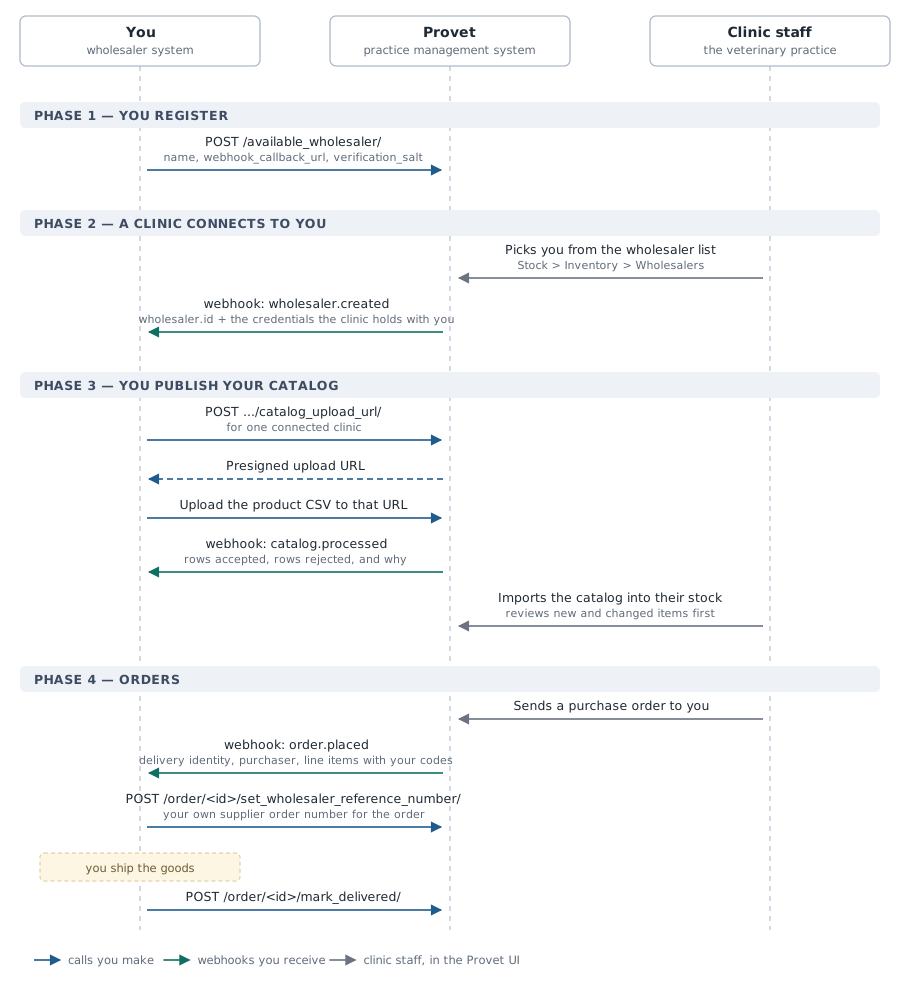
Register yourself as an
AvailableWholesaler— the entry clinics later pick from a list. You do this once per clinic database, and it carries the callback URL and signing secret used for everything after it. See Registering an Available Wholesaler.A clinic connects to you. Clinic staff select your registration in the Provet UI, which creates a
Wholesalerfor that clinic and delivers awholesaler.createdwebhook to you. That webhook is how you learn the clinic exists, and it carries the credentials the clinic entered for their account with you. Later credential or clinic location edits arrive aswholesaler.updated, and removing the link arrives aswholesaler.deleted. See Registering an Available Wholesaler.Publish your catalog for that clinic by requesting a presigned upload URL and uploading a CSV of your products to it. Provet validates the file as it lands and tells you what it made of it in a
catalog.processedwebhook. Clinic staff import from that catalog into their own stock when they choose to. See Making Products Available.Receive and fulfil orders. When clinic staff send a purchase order to you, Provet delivers an
order.placedwebhook with the full order. You write your own supplier order number back onto it, and once you have shipped it, you mark the order delivered. See Handling Orders.Report what you sent, line by line, with batch numbers and expiry dates. Each line is staged for clinic staff to review against what actually turns up. This is optional, and independent of marking the order delivered. See Reporting What You Sent.
What you need to build
An OAuth 2.0
client_credentialsclient using the dedicatedwholesalerscope (Scope, Webhooks and Errors).A publicly reachable HTTPS endpoint that receives and verifies webhooks. Phases 2 and 4 are only ever announced this way, so the integration cannot function without it. Signing and retry mechanics are described once in Scope, Webhooks and Errors.
A CSV export of your product catalog, in the column format described in Making Products Available.
Start with Scope, Webhooks and Errors, which covers the material shared by every phase, then follow the remaining pages in order.
Every operation and webhook event named in this guide is also specified in the Wholesaler API reference: request and response schemas, callback payloads, required scopes and rate limits, generated from the API itself and usable as an OpenAPI document to generate a client from.